API Payload Encryption
Overview
SaySwitch supports full request and response encryption for specially configured Server-to-Server (S2S) merchants.
This outer API payload encryption is separate from card-field encryption. Card-field encryption creates the value sent as
card; full payload encryption encrypts the complete API request containing that value.
Prerequisites
- Active SaySwitch merchant account
- Valid API keys (see API Keys)
- AES 256 encryption enabled in your dashboard
Enabling Encryption
Step 1: Access Encryption Settings
- Login to SaySwitch Dashboard
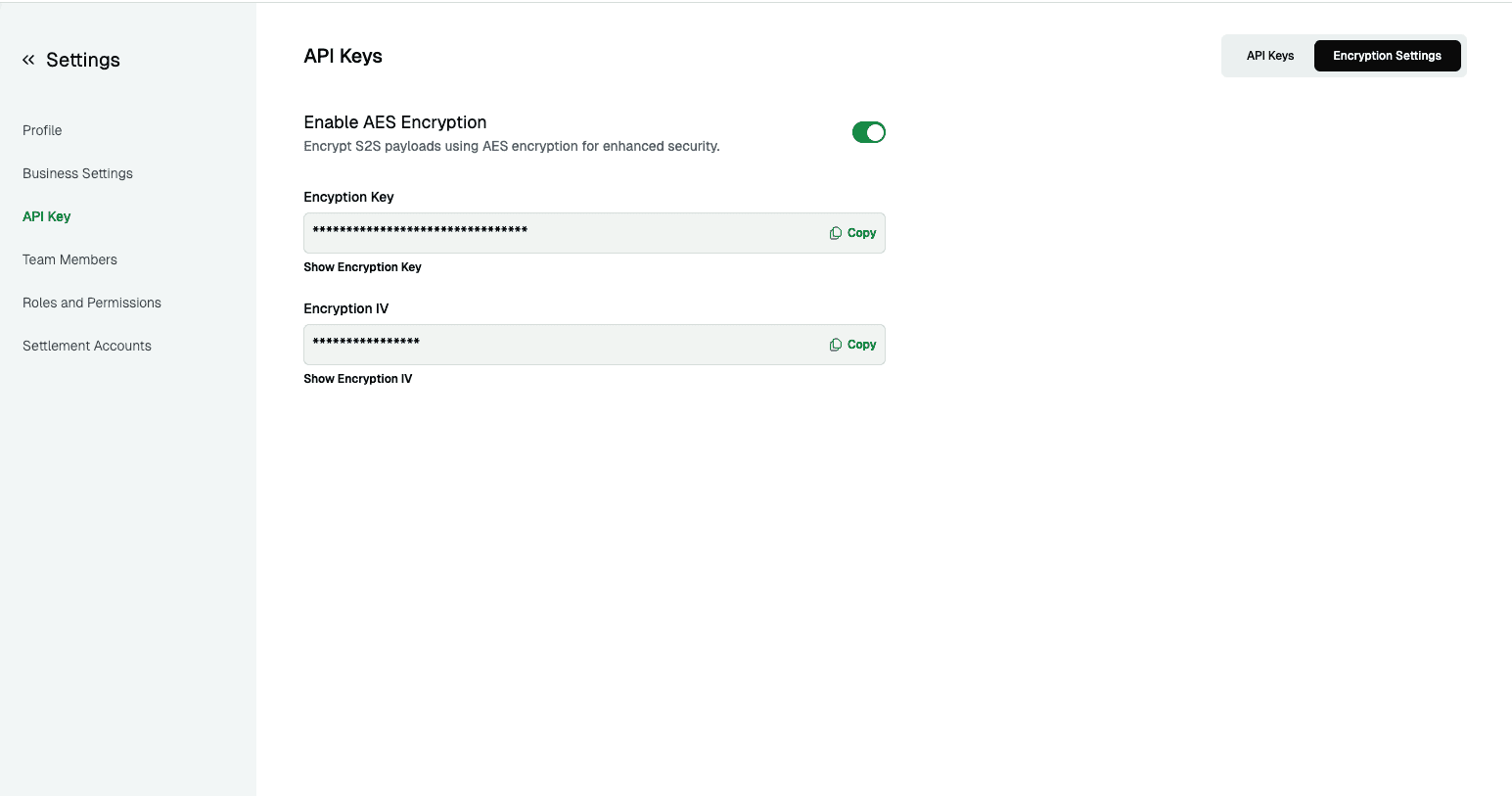
- Navigate to Settings > API Keys > Encryption Settings
- Toggle “Enable AES 256 Encryption”
- Your encryption key and IV will be automatically generated
Step 2: Retrieve Encryption Credentials
Once enabled, you’ll receive:
- Encryption Key: Merchant-specific 32-byte AES 256 key
- Initialization Vector (IV): Merchant-specific 16-byte initialization vector for CBC integrations
⚠️ Security Note: Store these credentials securely alongside your API keys.
Key Management
Regenerating Encryption Credentials
If your encryption credentials are compromised:
- Navigate to Settings > API Keys > Encryption Settings
- Disable AES 256 encryption
- Re-enable AES 256 encryption
- New encryption key and IV will be generated automatically
- Update your integration with the new credentials
Implementation
Encryption Process
- Prepare Payload: Convert your JSON payload to string
- Encrypt: Use AES 256 CBC with your key and IV
- Encode: Hex-encode the encrypted bytes
- Send: Include encrypted payload in request body
Request Format
When using encryption for S2S APIs, send requests with:
{
  "data": "ENCRYPTED_PAYLOAD"
}
Where ENCRYPTED_PAYLOAD is the hex-encoded encrypted request JSON.
Code Examples
const crypto = require('crypto');

function encryptPayload(data, key, iv) {
  try {
    const algorithm = 'aes-256-cbc';

    // Truncate IV to 16 bytes and convert to buffer
    const ivTruncated = iv.substring(0, 16);
    const keyBuffer = Buffer.from(key, 'utf-8');
    const ivBuffer = Buffer.from(ivTruncated, 'utf-8');

    // Create cipher
    const cipher = crypto.createCipheriv(algorithm, keyBuffer, ivBuffer);

    // Encrypt data and return as hex
    let encrypted = cipher.update(JSON.stringify(data), 'utf-8', 'hex');
    encrypted += cipher.final('hex');

    return encrypted;
  } catch (error) {
    return ''; // Handle encryption errors gracefully
  }
}<?php
function encryptPayload($data, $key, $iv) {
$algorithm = 'aes-256-cbc';
// Truncate IV to 16 bytes
$ivTruncated = substr($iv, 0, 16);
// Encrypt data
$jsonData = json_encode($data);
$encrypted = openssl_encrypt($jsonData, $algorithm, $key, OPENSSL_RAW_DATA, $ivTruncated);
// Return hex-encoded encrypted data
return bin2hex($encrypted);
}
?>import json
from Crypto.Cipher import AES
from Crypto.Util.Padding import pad
def encrypt_payload(data, key, iv):
try:
# Truncate IV to 16 bytes and convert to bytes
iv_truncated = iv[:16]
key_bytes = key.encode('utf-8')
iv_bytes = iv_truncated.encode('utf-8')
# Create cipher
cipher = AES.new(key_bytes, AES.MODE_CBC, iv_bytes)
# Prepare and encrypt data
json_data = json.dumps(data).encode('utf-8')
padded_data = pad(json_data, AES.block_size)
encrypted = cipher.encrypt(padded_data)
# Return hex-encoded encrypted data
return encrypted.hex()
except Exception as error:
return '' # Handle encryption errors gracefullyResponse Handling
Encrypted Responses
When full payload encryption is enabled for your S2S account, the API encrypts the controller’s complete response. CBC integrations receive the hex-encoded ciphertext directly in the response body with Content-Type: application/octet-stream; it is not wrapped in a JSON data property.
ENCRYPTED_RESPONSE_HEX_STRINGRead the raw response body as text, decrypt it using your configured credentials, and then parse the resulting JSON. Merchants specifically configured for the secure GCM/HMAC mode must use the envelope and credentials supplied for that mode.
Decryption Implementation
const crypto = require('crypto');

function decryptResponse(encryptedData, key, iv) {
  try {
    const algorithm = 'aes-256-cbc';

    // Truncate IV to 16 bytes and convert to buffer
    const ivTruncated = iv.substring(0, 16);
    const keyBuffer = Buffer.from(key, 'utf-8');
    const ivBuffer = Buffer.from(ivTruncated, 'utf-8');

    // Create decipher
    const decipher = crypto.createDecipheriv(algorithm, keyBuffer, ivBuffer);

    // Decrypt data (input is hex-encoded)
    let decrypted = decipher.update(encryptedData, 'hex', 'utf8');
    decrypted += decipher.final('utf8');

    return JSON.parse(decrypted);
  } catch (error) {
    return null; // Handle decryption errors gracefully
  }
}<?php
function decryptResponse($encryptedData, $key, $iv) {
$algorithm = 'aes-256-cbc';
// Truncate IV to 16 bytes
$ivTruncated = substr($iv, 0, 16);
// Convert hex string to binary
$encryptedBinary = hex2bin($encryptedData);
// Decrypt data
$decryptedJson = openssl_decrypt($encryptedBinary, $algorithm, $key, OPENSSL_RAW_DATA, $ivTruncated);
if ($decryptedJson === false) {
return null; // Handle decryption errors gracefully
}
$decryptedData = json_decode($decryptedJson, true);
if (json_last_error() !== JSON_ERROR_NONE) {
return null; // Handle invalid JSON
}
return $decryptedData;
}
?>import json
from Crypto.Cipher import AES
from Crypto.Util.Padding import unpad
def decrypt_response(encrypted_data, key, iv):
try:
# Truncate IV to 16 bytes and convert to bytes
iv_truncated = iv[:16]
key_bytes = key.encode('utf-8')
iv_bytes = iv_truncated.encode('utf-8')
# Create cipher
cipher = AES.new(key_bytes, AES.MODE_CBC, iv_bytes)
# Decrypt data (input is hex-encoded)
encrypted_bytes = bytes.fromhex(encrypted_data)
decrypted_padded = cipher.decrypt(encrypted_bytes)
decrypted = unpad(decrypted_padded, AES.block_size)
return json.loads(decrypted.decode('utf-8'))
except Exception as error:
return None # Handle decryption errors gracefullyTest & Verify Endpoint
You can test and verify your encryption implementation using our dedicated test endpoints:
Encryption Endpoint
Endpoint: /api/s2s/aes-encrypt
Method: POST
Headers:
iv- Your encryption IVkey- Your encryption key
Request Body: JSON string to encrypt
Example Request:
curl -X POST https://backendapi.sayswitchgroup.com/api/s2s/aes-encrypt \
  -H "iv: YOUR_ENCRYPTION_IV" \
  -H "key: YOUR_ENCRYPTION_KEY" \
  -H "Content-Type: application/json" \
-d '{"amount": 1000, "currency": "NGN"}'This endpoint will return the encrypted version of your JSON payload, allowing you to verify your encryption implementation.
Decryption Endpoint
Endpoint: /api/s2s/aes-decrypt
Method: POST
Headers:
iv- Your encryption IVkey- Your encryption keyContent-Type: application/json
Request Body: JSON object with encrypted_data field
Example Request:
curl --location 'https://backendapi.sayswitchgroup.com/api/s2s/aes-decrypt' \
  --header 'iv: YOUR_ENCRYPTION_IV' \
  --header 'key: YOUR_ENCRYPTION_KEY' \
  --header 'Content-Type: application/json' \
  --data '{
    "encrypted_data": "YOUR_HEX_ENCODED_ENCRYPTED_DATA"
}'This endpoint will return the decrypted JSON payload, allowing you to verify your decryption implementation and test the complete encryption/decryption cycle.
Security Best Practices
-
Credential Protection
- Store encryption keys securely in environment variables
- Never expose keys in client-side code
- Use different keys for test and live environments
-
Key Rotation
- Rotate encryption credentials regularly
- Immediately regenerate if compromise is suspected
- Test new credentials before deploying to production
-
Implementation Security
- Validate decrypted data structure
- Implement proper error handling for decryption failures
- Log encryption/decryption errors for monitoring
Troubleshooting
| Issue | Cause | Solution |
|---|---|---|
| Decryption failure | Wrong key/IV | Verify credentials from dashboard |
| Invalid encrypted data | Encoding issue | Check hexadecimal encoding and decoding |
| Endpoint error | Unsupported endpoint | Verify endpoint supports encryption |
| Key generation failed | Dashboard issue | Disable and re-enable encryption |
Testing Encryption
- Enable Test Encryption: Use test environment encryption settings
- Validate Implementation: Test with simple payloads first
- Error Handling: Test with invalid keys to verify error handling
- Performance: Monitor encryption/decryption impact on response times
Support
For assistance with payload encryption:
- Technical Support: support@sayswitch.com
- Security Questions: security@sayswitch.com
- Documentation: API Reference